
Education PC Information
Storage Configuration of the Educational Terminals
Among the Windows folders,
- Desktop
- Documents
- Pictures
- Music
- Videos
are stored on the educational and research computing system, so the same data is available no matter which educational terminal you log in from.
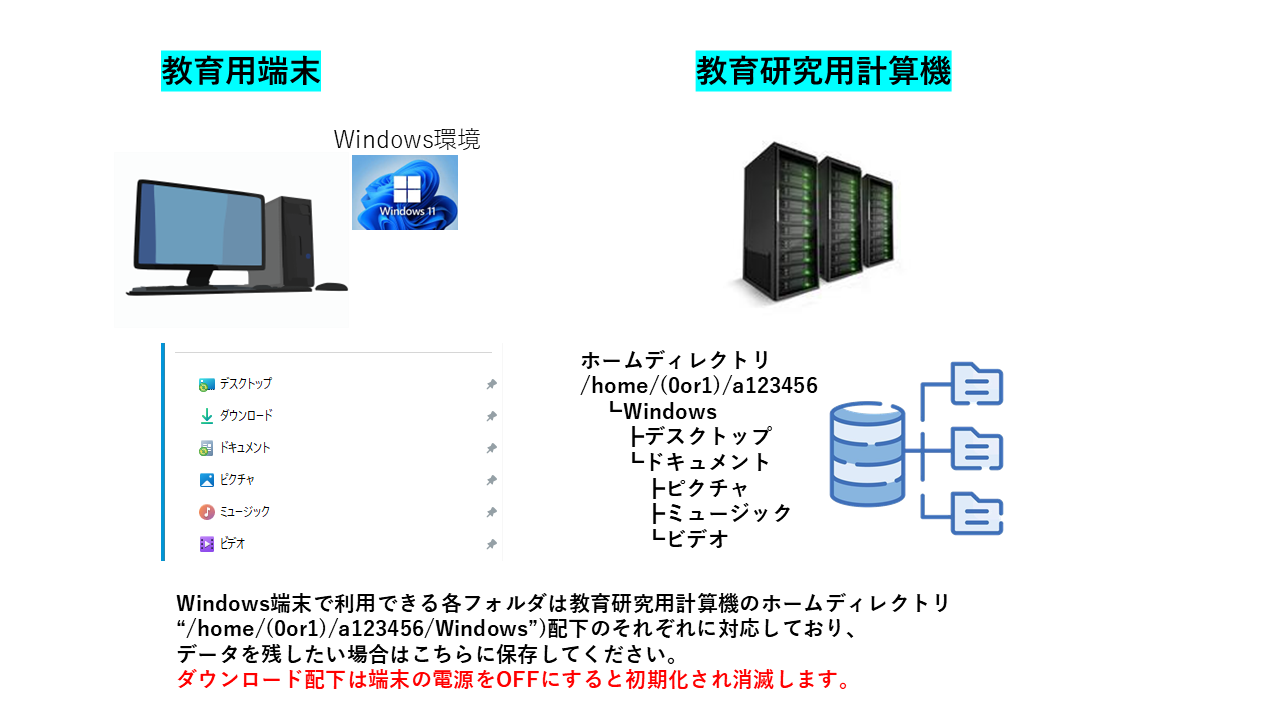
Files can also be saved in “Downloads” and in folders under C:\Users\<account>, but note that these are reset when the terminal is powered off.
Applications
The following applications are available on the terminals.
For education and research
| Application name | Version |
| Amazon Corretto | 21 |
| AutoCAD | 2025 |
| ChemOffice | 23.1.2 |
| Eclipse | |
| GaussView | 6 |
| MATLAB | 2024B |
| NCVC | 4.15a |
| OneCNC | |
| R | 4.4.3 |
| Abaqus | 2025 |
General purpose
| Applications | Version |
| Adobe Acrobat Reader | |
| Google Chrome | |
| Mozilla Firefox | |
| Office | LTSC 2024 |
| PuTTY | 0.82 |
| Tera Term | 5.3 |
| Visual Studio | 17.13.0 |
| Visual Studio Code | 1.96.4 |
| WinSCP | 6.3.6 |
Terminal Specifications
The terminal specifications are as follows.
| CPU | Intel Core i7-14700 |
| Memory | 16GB DDR5 |
| GPU | NVIDIA T400 4GB |
| Storage | 512GB M.2 SSD |