
Education Facility Information
Overview of the Information and Media Center Facilities
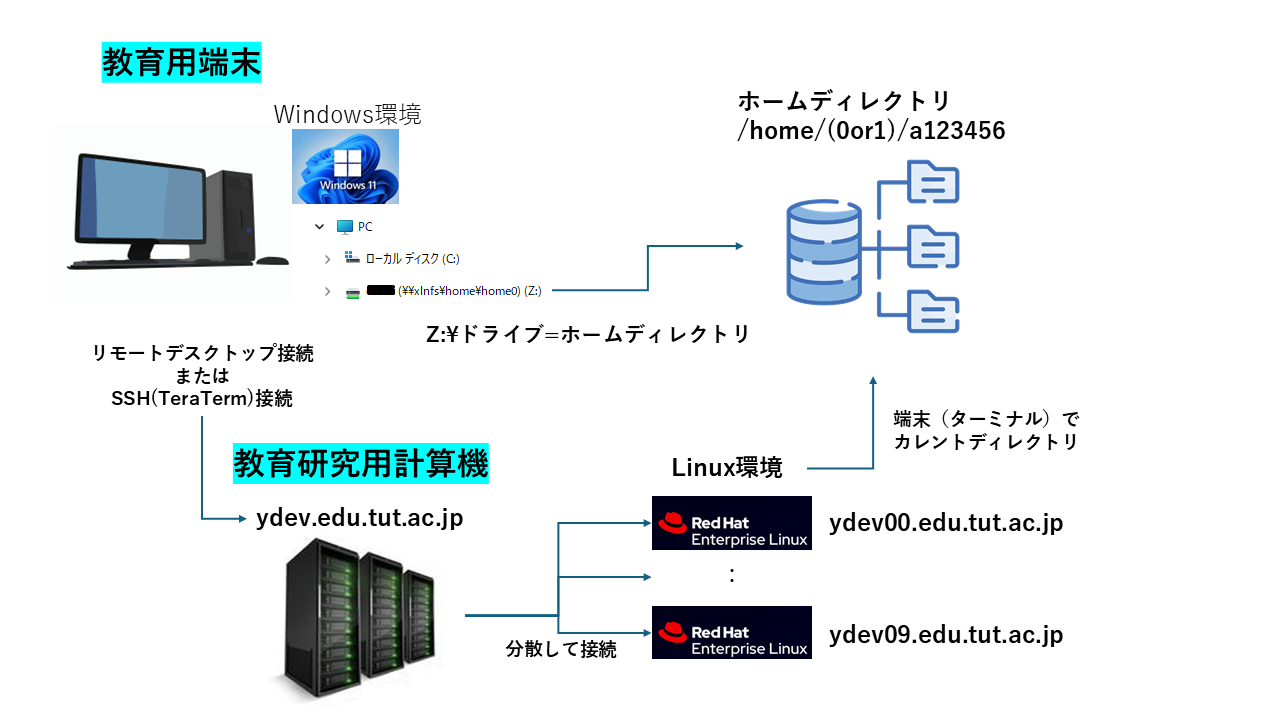
Personal computers are available in Terminal Room 1, Terminal Room 2 and the Multimedia Classroom of the Information and Media Center. These terminals run Windows 11 and provide a range of Windows applications such as Microsoft Office and Visual Studio. A Linux environment is also available by logging in to a Linux server from a terminal. Your personal files and settings are stored on a server rather than on individual terminals, so you get the same environment on any terminal.
Facility Information
The facilities are as follows.
|
Information and Media Center |
Equipment |
Units (+ instructor's desk) |
Hours of availability |
| Terminal Room 1 |
Windows 11 terminals |
48 (+1) | Before and after class hours |
| Terminal Room 2 | Windows 11 terminals | 20 (+1) | Before and after class hours |
| Multimedia Classroom | Windows 11 terminals | 28 (+1) | Before and after class hours |
| TBD-実験実習工場 |
Equipment |
Units | Hours of availability |
| Seminar room | Windows 11 terminals | 11 | Follows the facility's hours |
| Building C | Equipment |
Units (+ instructor's desk) |
Hours of availability |
| C1-202 | Displays | 69 (+1) | Follows the facility's hours |
Configuration of the Educational and Research System
Overall configuration
The overall configuration of the educational and research system is as follows.
Home directory quota
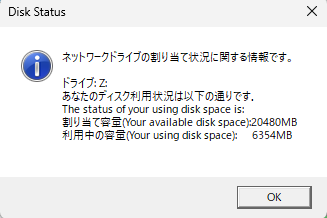
Each user is allocated a home directory quota of 20 GB.
To check how much of your home directory you are using, log in to Windows and look at the dialog that appears after a short while.
Terminal room opening hours
Weekdays 09:00 - 17:00 * Closed on Saturdays, Sundays and public holidays.
- Terminal Room 2 may be used for self-study, but classes take priority. Check the timetable on theAcademic Affairs Information System. Please leave the room when a class is in session.
- The rooms are not available on Saturdays, Sundays, public holidays, or over the New Year period.
- The rooms may also be unavailable for reasons such as equipment maintenance. Please allow plenty of time when working on coursework. Temporary closures are announced in theCenter Bulletin.
Timetable
You can check the availability of each room in the Google Calendar below. Note that you must be logged in with the Google account issued by the university.